Inverter
Solis Inverter - Knowledge Hub
Use this guide to identify and resolve common Solis inverter issues. Click a topic below to jump directly to the relevant instructions:
Solis Alarm: Finding Your Error Reason Code
Explains how to check the inverter screen for an alarm message and interpret common fault codes (e.g. CAN communication failure, no battery detected). Includes a full system restart procedure.
Learn MoreSystem Offline
Covers what to do when your inverter appears offline or disconnected from monitoring. Provides step-by-step reconnection guidance to restore communication between the inverter and batteries.
Learn MoreRestart Solis-Pylon System
Details how to safely power-cycle the inverter and batteries to clear persistent alarms or offline issues. Includes correct switch-off and power-on sequences for reliable system recovery.
Learn MoreSolis Alarm: Finding Your Error Reason Code
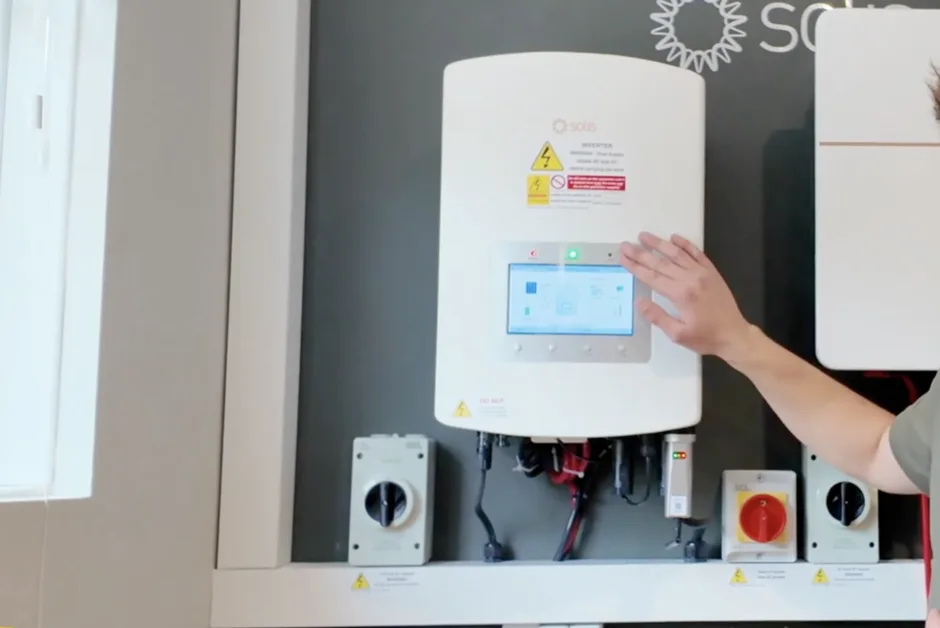
If your inverter is displaying a flashing alarm light, check the cause on the inverter screen. Press Enter, scroll to Advanced Information, then select Alarm Message. Common alarms include CAN communication failure, arc fault, or no battery detected. These are typically resolved by performing a full system restart. To restart the system:
- Turn the black isolator to OFF.
- Turn the red isolator to OFF.
- Switch each battery OFF, one at a time.
- Locate the main fuse and pull it firmly towards you to disconnect.
Leave the system powered down for 15 minutes.
After 15 minutes, power the system back up in the following order:
- Turn the red isolator ON.
- Turn the black isolator ON.
- Push the main fuse back in.
- Turn each battery ON, one at a time.
Identify the master battery — this is the one with the Ethernet cable connecting directly to the inverter (not daisy-chained) and two orange cables. On this battery, press and hold the SW button for approximately 15 seconds.
Wait 5–10 minutes for the system to reconnect. The alarm light should stop flashing once the inverter and batteries are communicating correctly.
If you’re still experiencing issues, call Greenscape Energy on 01473 727727 for further assistance.
System Offline
Hold the silver part of the datalogger and gently twist the black cap at the top anti-clockwise to remove it. Leave it disconnected from the inverter for at least 30 seconds, then carefully reinsert it, aligning the pins. Twist clockwise to reconnect — the dongle lights will begin flashing.
A solid green light means it has reconnected to Wi-Fi and monitoring will resume within 30 minutes. A flashing green light means no network connection — you’ll need to reset the datalogger.
To reset, press and hold the reset button on the back for 10–15 seconds until the LEDs flash. Then open your phone’s Wi-Fi settings and look for a network starting with Solis, S, 5, or D followed by numbers. If you can’t see this network, repeat the reset until it appears — it may take a minute.
Connect to that network using the password 123456789, then open a browser and go to 10.10.100.254.
- If you see an orange screen, log in with:
Username: admin
Password: Greenscape01 - If it looks different, use:
Username: admin
Password: 123456789
If the connection drops while loading, simply reconnect to the datalogger Wi-Fi and reload the page. Once on the Solis page, select Quick Set, choose your Wi-Fi network, and enter your Wi-Fi password (case-sensitive). Tap Save.
After about a minute, you’ll see the LEDs flash randomly — the green LED should turn solid, confirming the network is reconnected. The Solis network will disappear from your phone’s Wi-Fi list once connected. Wait 5–10 minutes for the app to refresh and show monitoring again.
If the green light keeps flashing after 30 minutes, repeat the steps.
If you’re still experiencing issues, call Greenscape Energy on 01473 727727 for further assistance.
Rebooting Your Solis and Pylon System
To restart the system:
- Turn the black isolator to OFF.
- Turn the red isolator to OFF.
- Switch each battery OFF, one at a time.
- Locate the main fuse and pull it firmly towards you to disconnect.
Leave the system powered down for 15 minutes.
After 15 minutes, power the system back up in the following order:
- Turn the red isolator ON.
- Turn the black isolator ON.
- Push the main fuse back in.
- Turn each battery ON, one at a time.
Identify the master battery — this is the one with the Ethernet cable connecting directly to the inverter (not daisy-chained) and two orange cables. On this battery, press and hold the SW button for approximately 15 seconds.
Wait 5–10 minutes for the system to reconnect. The alarm light should stop flashing once the inverter and batteries are communicating correctly.
If you’re still experiencing issues, call Greenscape Energy on 01473 727727 for further assistance.
Get in Touch with Our Support Team
We’re here to support you every step of the way. Whether you prefer to speak to someone directly, book a free survey at a time that suits you, or send us a message using the form, our team is ready to help.
Choose the option that works best for you and we’ll take care of the rest.
Phone us:
01473 727727
Thanks. We’ve got your message and will be in touch.